
Why are my Styku scan results inconsistent between sessions?
Why are my Styku scan results inconsistent between sessions?
Inconsistent scan results are almost always caused by environmental, placement, or positioning issues — not operator error. Even experienced, well-trained users can see varying results if the scanning space doesn't meet Styku's setup requirements. Work through the checklist below before contacting support.
1. Check Your Scanning Environment
The camera tower uses an infrared (IR) depth sensor. Anything that interferes with that sensor will affect results. The IR light emitted by the sensor does not affect human tissue and is classified as a Class 1 Laser, which is considered safe under all conditions of normal use — however, external infrared sources such as direct sunlight can still interfere with scan quality.
- No direct sunlight or bright ambient daylight. Sunlight is a major source of infrared interference. Use blackout blinds or scan in a room without windows, or with windows fully covered.
- Plain, matte background wall. The wall behind the person being scanned should be a neutral, matte colour — ideally grey. Glossy, reflective, or patterned surfaces can confuse the sensor.
- No objects in the scan area. Remove furniture, equipment, or anything else within the scanner's field of view. Objects behind or beside the person being scanned can interfere with body capture.
- Consistent lighting between sessions. If room lighting changes — for example, different times of day or lights left on versus off — results can vary. Keep lighting the same for every scan.
2. Check Scanner Placement
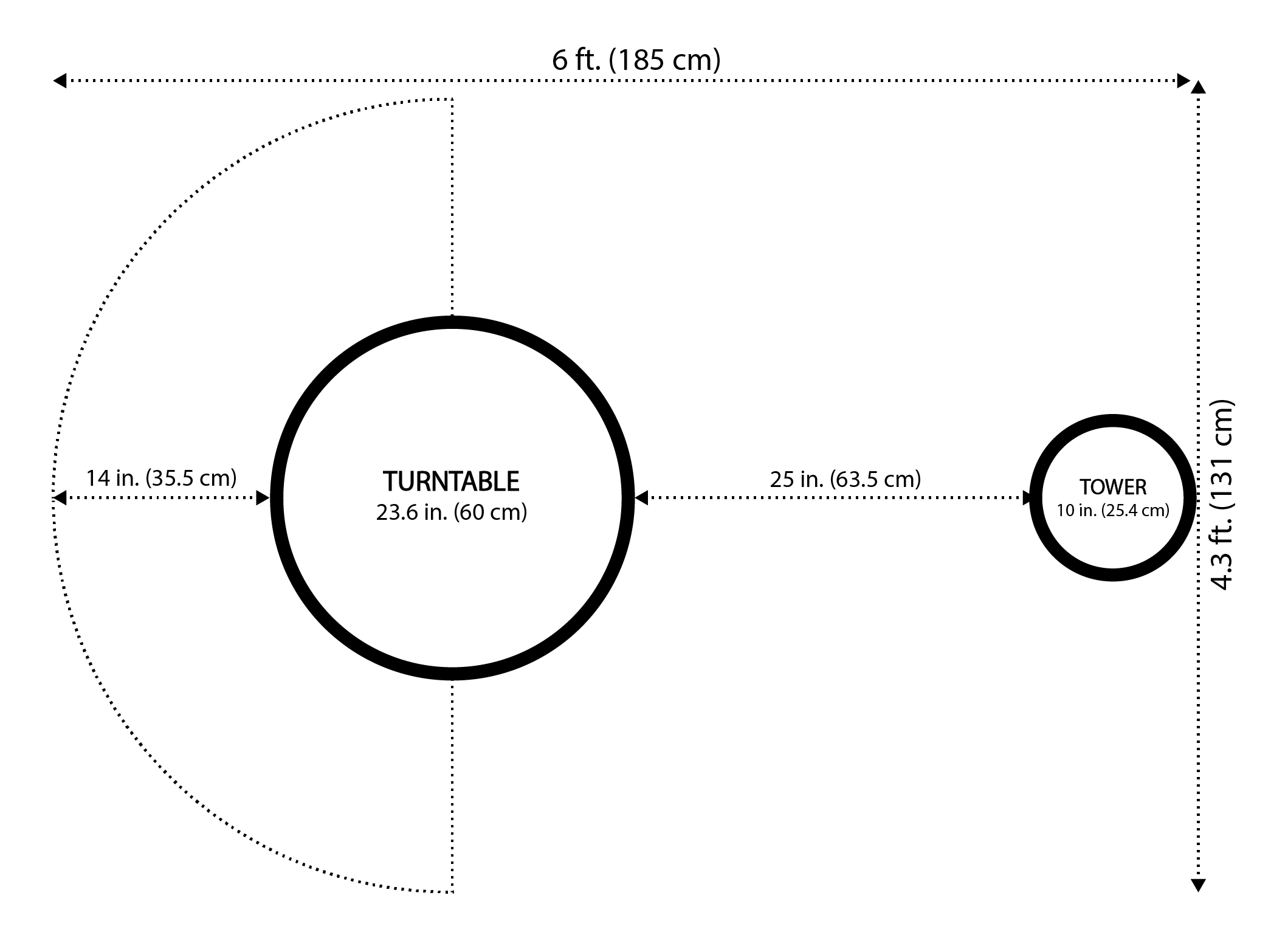
Per Styku's space requirements for the S100X scanner, the minimum room footprint needed is 6 ft by 4.3 ft. The following clearances must be maintained:
- 25 inches between the turntable and the sensor tower.
- At least 14 inches between the turntable and any side or back walls. (18 inches is recommended.)
- Camera tower position and height. The tower must be positioned at the correct distance and height relative to the turntable. If the tower has been moved — even slightly — re-check alignment.
- Keep the scanner in one fixed location. Do not move the tower or turntable between sessions. Mark their positions on the floor if needed.
(Reference diagram: https://2640795.fs1.hubspotusercontent-na1.net/hubfs/2640795/image-png-May-10-2022-04-55-19-78-PM.png)
3. Check Client Positioning and Clothing
- Consistent stance every time. Small changes in how a client stands — feet position, arm angle, head tilt — directly affect measurements. The scanner requires a specific neutral pose with arms slightly away from the body.
- Minimal, form-fitting clothing. Loose or layered clothing adds bulk that the scanner reads as body volume. Clients should wear the same type of fitted clothing (such as underwear or fitted shorts and a sports bra) at every session for comparable results.
- Wait for pose detection before scanning. The scanner will only start automatically once it detects the correct pose. Make sure the client is fully still and correctly positioned before the scan begins.
4. Understand Results at the Extremes
Some clients — such as competitive bodybuilders with very low body fat, or clients with atypical fat distribution — may produce results that fall outside the ranges Styku's algorithms are optimised for. In these cases:
- Results may differ from other measurement methods (calipers, DEXA, etc.)
- This is expected behaviour, not a scanner fault
- Use trend tracking across multiple scans rather than relying on a single session result
- Photos and manual assessments can supplement scanner data for these clients
5. Perform a Test Rescan
If you are unsure whether a result is accurate, scan the same person twice in the same session. Results should be very close. A large discrepancy between two back-to-back scans on the same person in the same session points to an environmental or hardware issue rather than normal variation.
6. If the Problem Persists After Checking All of the Above
If you have confirmed your environment, placement, and positioning are all correct and results are still inconsistent, the issue may require a hands-on review with a Styku technician. A live remote session allows the support team to observe your setup in real time and identify anything that may not be obvious from a description alone.
To request a remote support appointment, submit a support ticket through the Styku Business Portal at styku.com/portal. Target response time is one business day.
If this resolves your issue, no further action is needed.
If the problem persists, contact support and include: your scanner model, a description of the specific measurements that vary between sessions, the types of clients affected, photos or a short video of your scanning room setup (showing background, lighting, turntable placement, and distance from walls), and the Styku Studio software version shown in the app.
Applies to: All Styku scanner configurations; Styku Studio V5
Related Resources
- What are the space requirements to operate the S100X scanner?
- Is the sensor harmful or invasive? Can people with pacemakers be scanned? Can I scan pregnant people?